 |
| Case in point, I had to reach back to March to find a photo of me with my kids. |

Friday, November 16, 2012
Follow Friday - Moms should stay in photos
If you are like me, you spend a lot of time taking photos. As genealogists we love photographs and usually are the ones to remember to pull out the camera to make new memories for our descendants. But how often are you in the photo? I, for one, have very few to no photos of myself. I've never thought of myself as photogenic and I don't like to have my photo taken unless I'm "gussie up." But a while back I read an article by Allison Tate here, which describes her own fear of photos and the need to put ourselves back in the picture. While this is written from a mother's point of view, it is just as true for fathers, grandparents or any relative.


Wednesday, November 14, 2012
Wordless Wednesday - Creed Ladies
 |
| The Creed sisters. Front row (l-r) Mattie Maxwell, Monnie Bausell and Jessie Kellogg. Back row (l-r) Mintia Whitlock, Gussie Kuhn and Etta Demieville. |
Tuesday, November 13, 2012
Tuesday's Tip - Comments in Adobe Reader
I ran across an issue today with Adobe Reader. I was downloading a newspaper page from Genealogybank.com that included an article on a distant uncle. The actual newspaper page did not show the newspaper title or date, so in order to include all the information I needed to remember I would have had to name the file:
Thomas fruit assoc Daily Inter Ocean Chicago 1_14_1891.pdf
That is one long file name. And yes, I could have shortened some of the terms but I have a horrible memory and I doubt that one day I would remember that DIO stood for Daily Inter Ocean.
I had the bright idea to add meta data to the PDF file, similar to how I add it to my photo files. However, I quickly learned that you can not edit or add meta data to PDF files through Adobe Reader. (This can be done with full Adobe Acrobat). Well, after a little thought I came up with this work around.
Adobe Reader allows you to add comments and highlight documents. This tool allows you to edit documents, or in this example, allows you to add a comment that may help you remember more details about the file.
When you open your PDF file in Adobe Reader you will see two quick links to click for adding comments to the file along the top of the program. You can either add a comment or you can choose to highlight a specific section. Click on the "speech bubble" or Sticky Note icon to add a comment to your page.

When you click on the icon your mouse pointer will turn in to a speech bubble. You can place your Sticky Note anywhere on the page by clicking in the location you want. A yellow and white speech bubble will then appear with a text box. I added the publication data and when and where I found the article. If you find that you no longer need the Sticky Note, simply click on the speech bubble and delete it. If you have multiple notes you can organize them under the comment list on the right-hand side of the screen.
Save your file and the note will now be visible every time you open the file. A great way to share information with fellow researchers. Enjoy!
Thomas fruit assoc Daily Inter Ocean Chicago 1_14_1891.pdf
That is one long file name. And yes, I could have shortened some of the terms but I have a horrible memory and I doubt that one day I would remember that DIO stood for Daily Inter Ocean.
I had the bright idea to add meta data to the PDF file, similar to how I add it to my photo files. However, I quickly learned that you can not edit or add meta data to PDF files through Adobe Reader. (This can be done with full Adobe Acrobat). Well, after a little thought I came up with this work around.
Adobe Reader allows you to add comments and highlight documents. This tool allows you to edit documents, or in this example, allows you to add a comment that may help you remember more details about the file.
 |
| Quick links for adding comments are circled above. |

When you click on the icon your mouse pointer will turn in to a speech bubble. You can place your Sticky Note anywhere on the page by clicking in the location you want. A yellow and white speech bubble will then appear with a text box. I added the publication data and when and where I found the article. If you find that you no longer need the Sticky Note, simply click on the speech bubble and delete it. If you have multiple notes you can organize them under the comment list on the right-hand side of the screen.
Save your file and the note will now be visible every time you open the file. A great way to share information with fellow researchers. Enjoy!
Thursday, November 8, 2012
Baldwin City, Kansas home update
Quite a while ago I wrote a post about this house in Baldwin City, Kansas.
 Yesterday I received a comment on that post from a teenager that currently lives in the area and thought the house looked familiar. She wondered if I had any idea where the house was because she was sure she could find it. Problem? I had no idea. So, thanks to Bee I dug a little deeper.
I knew that my 2nd great grandmother, Cora Ozias Kuhn Martin Wolverton (whew!), lived in Baldwin City from around 1900 to 1920. But I wasn't sure when. However, since I last conducted research some additional plat maps have been added online at the Kansas Memory website. I was able to track down Cora's location in 1921.


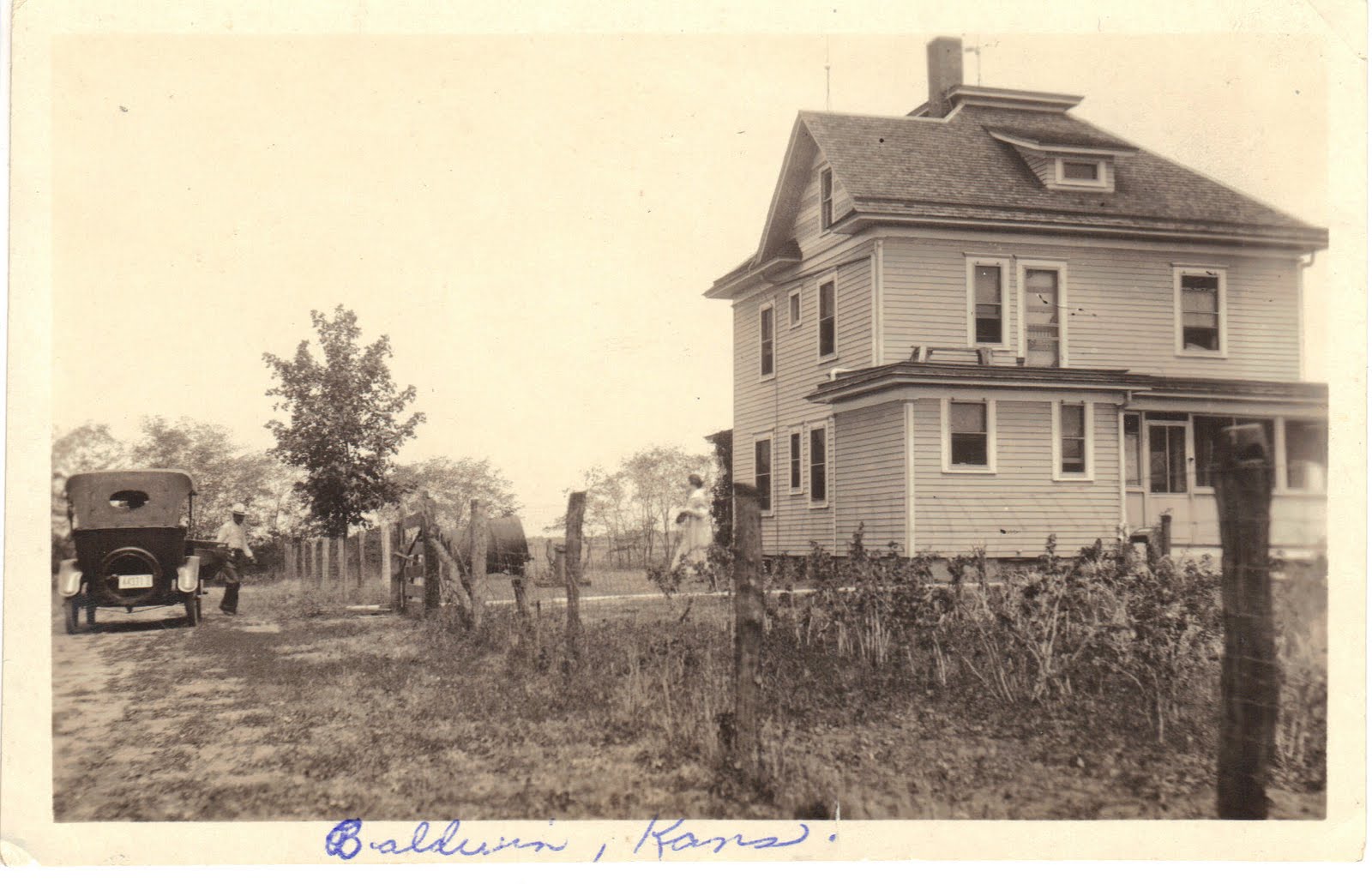
I knew that my 2nd great grandmother, Cora Ozias Kuhn Martin Wolverton (whew!), lived in Baldwin City from around 1900 to 1920. But I wasn't sure when. However, since I last conducted research some additional plat maps have been added online at the Kansas Memory website. I was able to track down Cora's location in 1921.

You can see Cora's property circled in red. It is just south east of town, but there are no roads listed. It also appears that she is due east of the rail head. I hunted around with Google Earth for a while, but couldn't find a house that looks like the photo.
A second atlas from 1902 shows a better view and includes street names.
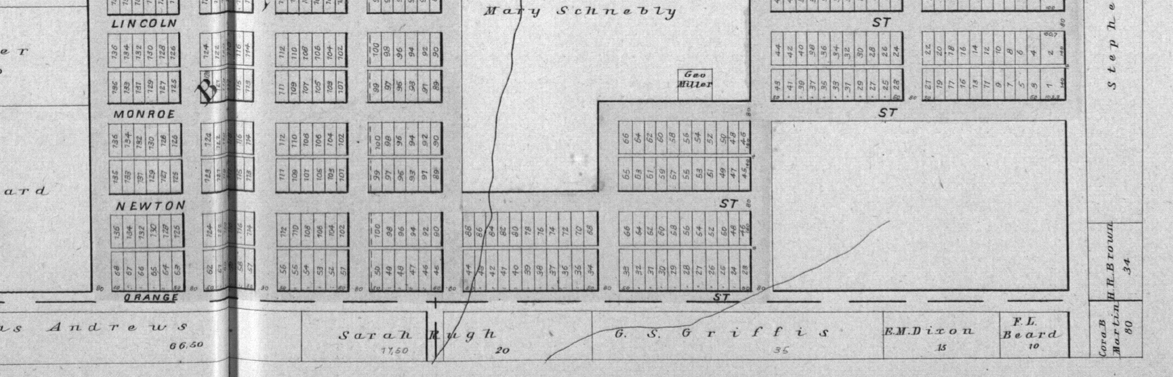
You can see that it appears that Cora lives on the southeast corner of Orange and 1st Steet. I checked out that location and there is no house similar to the one in the photo. I guess it was lost to time.
Wednesday, November 7, 2012
Wordless Wednesday - F.E. and Gussie Kuhn
 |
| My great-grandparents, F.E. & Gussie Kuhn. My father's resemblance to his grandfather is uncanny. |
Tuesday, November 6, 2012
Tech Tuesday - Evernote for Genealogy
I am a very big fan of the website, Evernote. I was first introduced to this site during a random search for organization apps for my phone. At the time I had no idea how helpful this app would become.

Evernote is a collection of products focused on organization. The company offers a multitude of different applications designed to help people get organized and communicate with each other. One of the first times I used Evernote I was helping my husband with a project for his master's degree. I had found a lot of links on the Internet that may be relevant for his project, but just sending the link to him was not a very efficient way for him to quickly weed out the sources that he wouldn't be able to use. With Evernote I was able to create "notes" for my husband that included not only the link to the source, but also a screen shot.
Evernote works by allowing you to capture information on the Internet in a digital notebook. You can download the application to your home computer and add the application tool to your web browser. You are then able to easily create a "note" within the application based on anything you find online that you want to remember later. There is also an application for smart phones and tablets. The best part is that you can sync all your notes through one account in the cloud. This means that notes created from your desktop can be viewed on your smart phone, tablet or laptop. A great option for carrying research queries from home to the library, historical society or on a cemetery visit.
With Evernote you can create "Notes" within a notebook all along a particular topic. You can then share your notebook with other Evernote users. A perfect option for joint genealogy research.


Evernote is a collection of products focused on organization. The company offers a multitude of different applications designed to help people get organized and communicate with each other. One of the first times I used Evernote I was helping my husband with a project for his master's degree. I had found a lot of links on the Internet that may be relevant for his project, but just sending the link to him was not a very efficient way for him to quickly weed out the sources that he wouldn't be able to use. With Evernote I was able to create "notes" for my husband that included not only the link to the source, but also a screen shot.
Evernote works by allowing you to capture information on the Internet in a digital notebook. You can download the application to your home computer and add the application tool to your web browser. You are then able to easily create a "note" within the application based on anything you find online that you want to remember later. There is also an application for smart phones and tablets. The best part is that you can sync all your notes through one account in the cloud. This means that notes created from your desktop can be viewed on your smart phone, tablet or laptop. A great option for carrying research queries from home to the library, historical society or on a cemetery visit.
With Evernote you can create "Notes" within a notebook all along a particular topic. You can then share your notebook with other Evernote users. A perfect option for joint genealogy research.

The above screenshot shows an example of a notebook. In the left hand column you can see the various notes I have created on this particular topic. The right-hand screen shows one note in full.
A basic Evernote account is free or you can upgrade to a premium account for $5/month or $45/year. You can download Evernote software here for free.
I use my Evernote account to keep ideas for my blog in one handy place. Whether it is an interesting website or a note I write to myself with possible post topics, they are all in one location. You can also create tags for your notes to help categorize them.

You'll note above that I have tags for various topics such as "Genealogy" and for specific tags like "Celia Butler," one of my ancestors.
Click here for a starter's guide to Evernote.
The uses for Evernote in genealogy research seem to be endless and I'm just scratching the surface. Have you used Evernote for your research?
Monday, November 5, 2012
Military Monday - "The Fighting 20th," the 20th Kansas Volunteer Infantry
Recently I was putting together a post on my 2nd Great-Grandmother, Cora Ozias. In gathering facts I re-read the obituary for her mother, Christine (Potterf) Ozias.
The obituary mentions that two of her sons, Joseph and Ernest, are members of the 20th Kansas Volunteer Infantry and were currently serving in Manila. Now here is a new military avenue for me to research. I am not familiar with the late 19th century military actions, other than I know that A Message to Garcia was written around this time.
The 20th Kansas Volunteer Infantry was mustered into service on May 16, 1898. Joseph W. Ozias and Ernest Ozias, brothers to my 2nd great-grandmother Cora Ozias Kuhn, were assigned to Company H.

 |
| From The Seneca Tribune dated Thursday, January 26, 1899. |
The 20th Kansas Volunteer Infantry was mustered into service on May 16, 1898. Joseph W. Ozias and Ernest Ozias, brothers to my 2nd great-grandmother Cora Ozias Kuhn, were assigned to Company H.
 |
| A list of the Soldiers in Company H, 20th Kansas Volunteer Infantry, as printed May 17, 1898 in the Kansas Weekly Capital in Topeka, Kansas |
The Spanish-American War was spurned by America's desire to protect it's western shipping lanes and a long-standing disdain for the treatment displayed by Spain towards its territories. The war was declared in April 1898 and ended four months later. Many historians claim that it was this war that officially made America a global power. America gained the Phillipines, Guam and Puerto Rico as territories from Spain and also annexed Hawaii as a result of war.
The 20th was made of volunteers from the state of Kansas. The Fighting 20th, History and Official Souvenir states that the 20th was the first regiment mustered in to service from Kansas where not a single man signed with "his mark." Mustered in May 1898, the unit was sent to San Francisco for training and was there for five months in preparation to head to the Phillipines. Pay close attention to the dates and you will note that the 20th did not participate in the Spanish-American war because by the time they arrived in the Phillipines the war was "officially" over. Following the war, Spain was forced to cede the Phillippines to the United States. This disappointed many Fillipinos and they clashed with American forces for the next three years. Therefore, the eight months the Fighting Twentieth spent in battle were part of the Phillipine Insurrection or the Phillipine-American war.
 |
| "Philippine Islands: A regiment of sure shots - the fighting 20th Kansas repelling an attack," call Number: LOT 11522-1, Repository: Library of Congress Prints and Photographs Division Washington, D.C. 20540 USA |
Both of the Ozias brothers participated in the regiment's training in San Francisco and both went to the Phillipines. Records show that Ernest Ozias was discharged in Manila and for some unknown reason stayed there.

Following his service, Joseph Ozias stayed active in the Fighting 20th veteran's group serving in various leadership positions. Ernest Ozias was admitted to the Veteran's home in Leavenworth, Kansas, based on his service. Both men also have veteran's headstones.
 |
| Joseph Ozias' headstone in Oak Hill Cemetery, Lawrence, Kansas. His date of death is unknown. |
 |
| Ernest Ozias' headstone in Leavenworth National Cemetery, Leavenworth, Kansas |
For more information on the Fighting 20th or the Spanish-American war visit the following links:
The World of 1898 - The Spanish-American War, a Library of Congress presentation
The Spanish American War, 1898, U.S. Department of State Office of the Historian
Crucible of Empire, The Spanish American War, a collection of information by PBS
The Fighting Twentieth, Kansas GenWeb
Subscribe to:
Posts (Atom)